NovaThirds
21 animated lower thirds — free.
A free pack of 21 drag-and-drop lower thirds for DaVinci Resolve — minimal, broadcast, social and cinema styles. Name and subtitle with staggered, eased animation, preview thumbnails in the Titles menu, and an outro that stays glued to the end of the clip when you trim it. Editable in the Inspector, works in free Resolve.
What it does
21 lower thirds, four moods
Minimal, broadcast, social and cinema — clean side-bars, news strips, gradient social chips and serif film credits. The right lower third for whatever you're cutting.
Name + subtitle, eased animation
Every style animates a name and subtitle in with staggered, eased motion — the polished movement that makes a lower third feel designed, not dropped on.
Outro that sticks to the end
Trim the clip to any length and the outro stays glued to the end — the same mechanism Resolve's own titles use, so it always exits cleanly.
Editable in the Inspector
Type your name and subtitle, then tweak font, colour, size and position in the Inspector. Preview thumbnails show in the Titles menu so you pick the right one fast.
All 21 lower thirds
Every style in the pack — each one drag-and-drop and fully editable. Click to see it full-size.
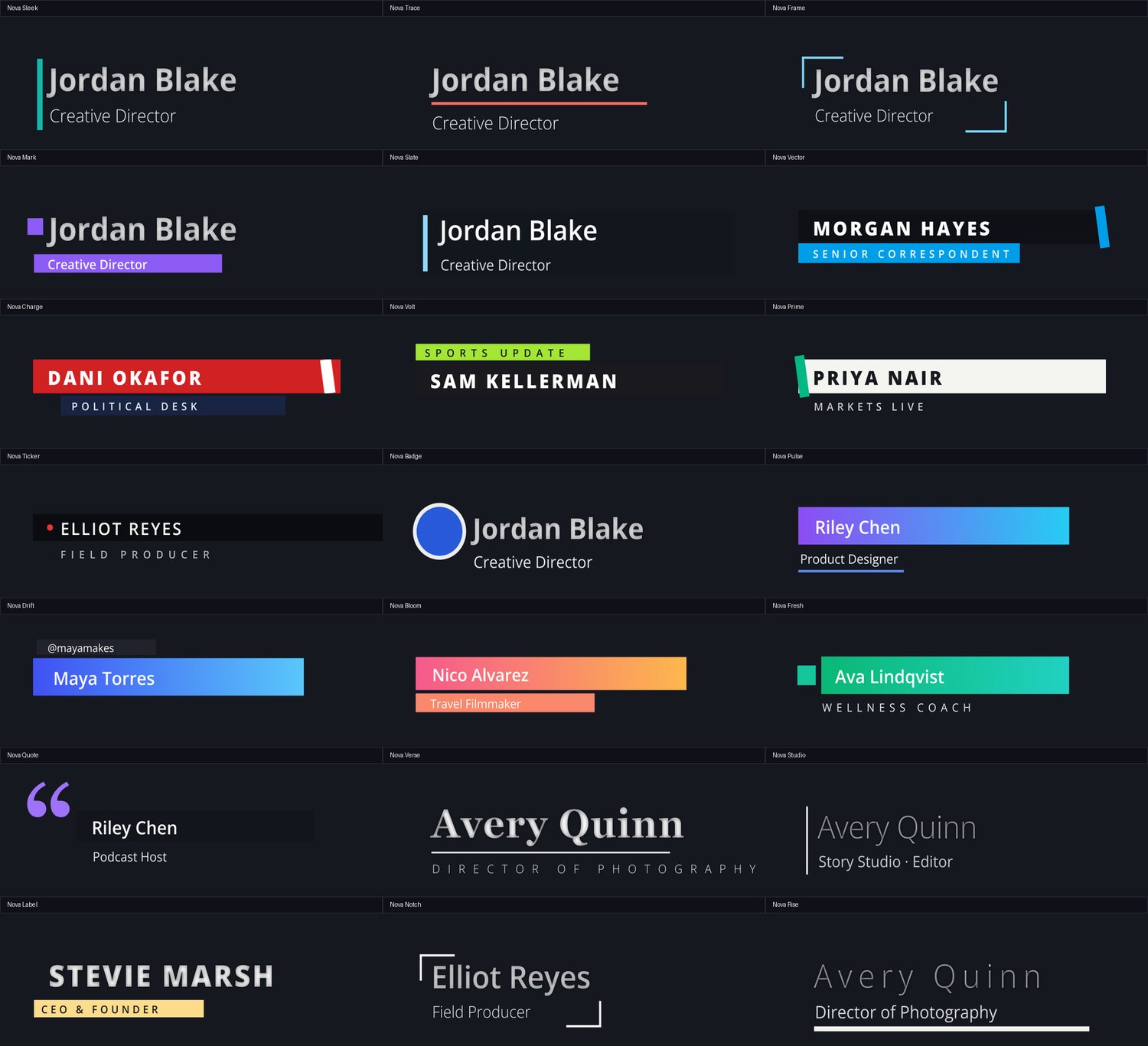
The 21 styles
- Nova Sleek
- Nova Trace
- Nova Frame
- Nova Mark
- Nova Slate
- Nova Vector
- Nova Charge
- Nova Volt
- Nova Prime
- Nova Ticker
- Nova Badge
- Nova Pulse
- Nova Drift
- Nova Bloom
- Nova Fresh
- Nova Quote
- Nova Verse
- Nova Studio
- Nova Label
- Nova Notch
- Nova Rise
How it works
Download & install
Grab the free zip and double-click NovaThirds.drfx — Resolve opens and installs the pack itself. Then restart Resolve.
Find it in Titles
Edit page → Effects Library → Titles → the NovaThirds group. Each style shows a preview thumbnail.
Drop it on & type
Drag a lower third onto a track above your footage, type your name and subtitle, and restyle it in the Inspector.
Reviews
No reviews yet — be the first to review NovaThirds.
FAQ
Is it really free?+
Yes — all 21 NovaThirds lower thirds are free to download and use, forever. There's no license key and no account. If it saves you time there's an optional 'pay what you want' tip, but it's completely up to you.
How many lower thirds do I get?+
21 animated lower thirds across four moods — minimal, broadcast, social and cinema. Every one is drag-and-drop and fully editable.
Does it work with the free version of Resolve?+
Yes. NovaThirds works in the free version of DaVinci Resolve as well as Studio, on macOS and Windows.
Do I need internet to use it?+
Only to download it once. After that it's just part of your Titles library — nothing is sent anywhere, and there's nothing to activate.